CoCon is Televic Conference's complete software solution for the configuration and management of your meeting. CoCon consists of different applications, which are available through different license models. Which applications you need, depends on the conference functions you require. For example if your meeting is multilingual, then you need the Interpretation application to configure the languages of your meeting. Or use the Video application to route the video streams used in your meeting.
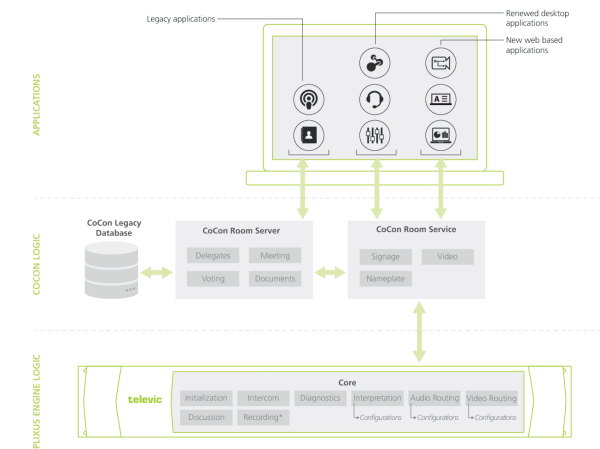
The image below shows the architecture of CoCon and its applications, and the relation with the Plixus engine and Plixus Core.
Figure 1-1 CoCon architecture and relation to Plixus Core (* Recording is only possible with a Plixus AE-R)
There are three types of applications:
Plixus Core allows the Plixus engine to run independently of a computer. You can configure different settings of the Plixus engine using the web server. For more extensive configuration you need CoCon, for example for custom audio routing, combining booths or to create video routing configurations. When you create the configurations for interpretation, audio routing and video routing, these are stored in Plixus Core and the engine can access them without using CoCon.
The new CoCon gradually migrates to a new architecture where the old CoCon Room Server (which is a Windows application) is replaced by a CoCon Room Service (which is a Windows service). Currently, you need to install and run both, to use all CoCon applications. The Room Service is now the direct interface between Plixus Core and the redesigned applications:
The Room Server is still the interface for the Operator application and the Meeting Manager. They still communicate with the legacy database. This means that all functionality is still available, but a part of it runs embedded (Core) and a part of it runs on the Room Server.
All client applications still benefit of the client-server architecture that was already available.
Plixus Core allows you to run and use different conference functions independent of a computer. You can configure these settings using a web server which you access by navigating to the IP address of the Plixus engine. The table below shows you which functions are available in Plixus Core and which you can configure in CoCon: